
A generic draft
We are thrilled to announce an innovative update that will revolutionize your workflow and unlock your team's full potential.
Brand voice
Merlin brings your business context and writing guidance into social drafts. Useful edits and feedback help refine your voice over time. You review what goes out.
Get to the point.
Show what actually happened.
Write like a person.
Illustrative voice profile
“That sounds more like us.
Keep that tone.”
01 Your context comes first.
02 Your guidance stays editable.
03 Your judgment stays in charge.
How it works
Start with what you know. Refine it through the work.
Add your website and business information, or enter the details yourself. Review the audience, positioning, and brand context Merlin will use.
Describe your voice, preferred phrases, and what to avoid. Keep this guidance editable as your business and message change.
Edit copy and give specific feedback. Merlin can turn eligible edits and active feedback into reusable writing preferences.
Stored voice guidance helps shape later copy for that brand. Read the result, check the facts, and make the final changes.
The same idea. A clearer voice.
Writing guidance changes the way a message is told. These examples show the difference. They are illustrative, not customer results.
A generic draft
We are thrilled to announce an innovative update that will revolutionize your workflow and unlock your team's full potential.
With clear voice guidance
We kept hearing the same thing: finding the next draft took too long. So we put drafts and feedback in one place. Here is what changed.
A concrete problem. Plain words. No oversized promise.
Example guidance: be direct, use concrete details, and avoid hype. Always check product facts before you publish.
Inside Merlin
Keep voice traits, phrase preferences, and messaging boundaries in your brand. Review the guidance alongside your business context.
A voice profile is a starting point. Your edits and feedback help make the guidance more useful.
See the full product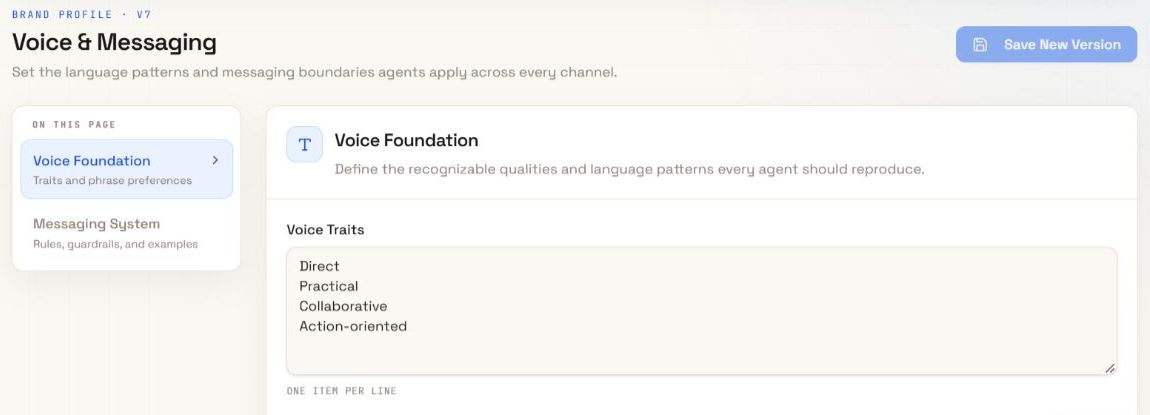
A few useful answers
Your brand voice is the way your business communicates: its tone, phrasing, rhythm, and recurring writing choices. Merlin uses stored guidance to help shape those choices in social content.
Merlin starts with the business and writing guidance you provide. It can learn reusable style preferences from eligible edits to post copy and explicit feedback. Every small edit does not become a permanent rule.
Yes. You can review and edit your brand's voice and messaging guidance. You can also refine individual drafts before you approve them.
No. Voice guidance shapes style. Your approved business information supplies the facts. You must still check accuracy, context, and platform fit before publishing.
Brand context and voice guidance belong to a brand. Keep different businesses in separate brands and review the guidance for each one.
This page explains the brand voice feature inside Merlin. It is not a standalone generator. Merlin has paid plans and does not offer a free trial.
Your ideas. A full team.
Bring your business, your voice, and your next idea.