
AI content calendar
Your content.
A clearer
calendar.
Merlin's AI social media content calendar brings dated drafts, channel formats, and post review into one workspace. See what is planned. Open what needs your attention.
The plan, in view
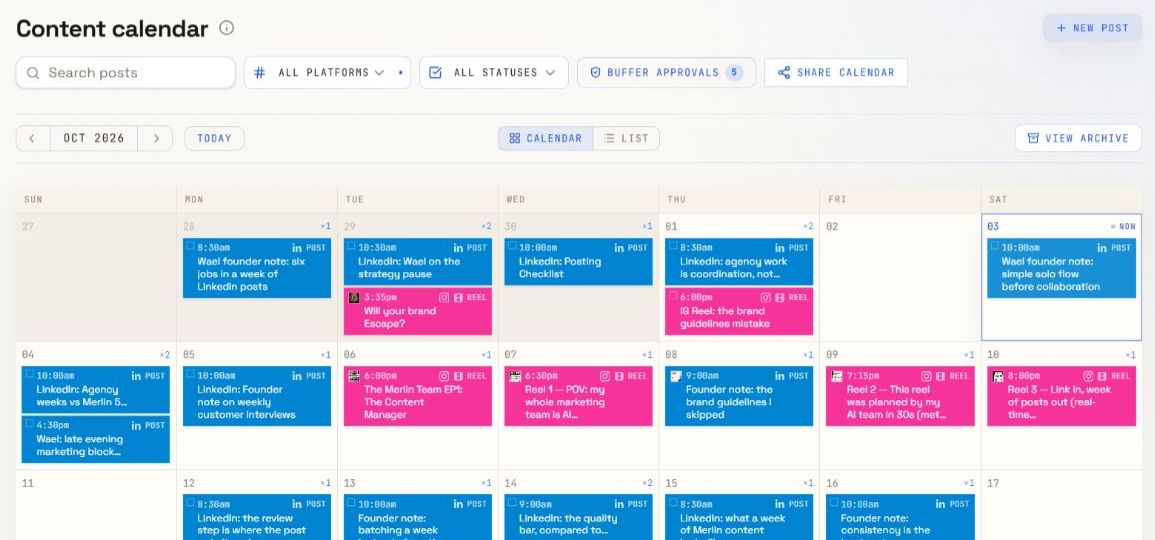
LinkedIn posts. Instagram reels. One view of the work ahead.
Calendar and list views
Platform and status filters
Drafts ready for your review
From an idea to a dated draft
Plan the week.
Keep the detail.
The calendar connects your plan to the posts themselves.
- 01
Bring the context.
Keep your business brief and voice guidance in Merlin. Give the team an idea, a channel, and a direction for the next batch.
- 02
Create the drafts.
Ask for content in a conversation. Open saved posts from the conversation workspace and check the copy and format.
- 03
Put dates in view.
Keep dated posts together in the calendar. Use platform and status filters to focus on the work you need to review.
- 04
Review the next move.
Check each post before publishing. Confirm the channel, media, date, and publishing method in the post workspace.
The work behind the date
A calendar entry.
A real post.
Open a calendar post to see the copy, channel, format, and preview. Keep the final check close to the content.
- Check the message and facts.
- Review the channel and format.
- Confirm how the post will publish.
A calendar date records your plan. Publishing depends on the supported method, connected account, and required approval.
Explore social scheduling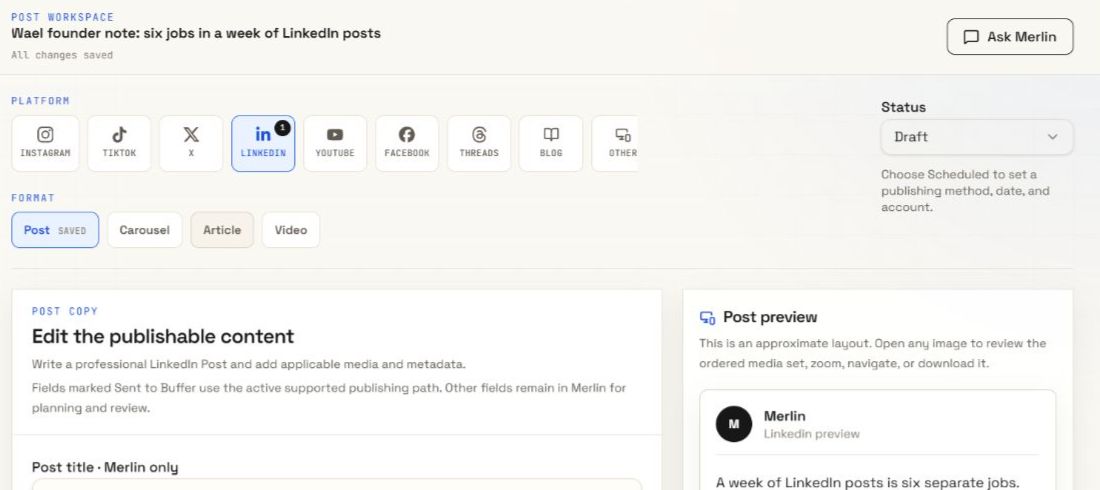
The context stays with the work
Your business.
Across the week.
A calendar gives your posts a place. Your business brief and voice guidance give the team a direction. Keep them together in the selected brand, then review each draft against that guidance.
Explore brand voiceBefore you plan
A few
clear answers.
What is Merlin's AI content calendar?
It is a workspace for social media posts created with Merlin or added by you. See dated posts in a calendar, switch to a list, and open a post to review its content and settings.
Can I see different channels in one calendar?
Yes. The calendar shows posts across channels for the selected brand. Use the platform filter to focus on one channel and the status filter to narrow the view further.
What happens to posts without a date?
The calendar has a separate area for unscheduled posts. Keep an idea or draft there until you decide where it belongs in your plan.
Does a calendar date mean a post will publish automatically?
A date is part of your plan. Automatic publishing also needs a supported publishing method, a connected account, and any required approval. Check the post workspace and publishing status before you rely on a scheduled post.
Can I keep calendars separate for different businesses?
Yes. Choose the brand you want to work with. Its calendar and business context stay with that brand. Check the selected brand before you create or review a post.