
The Merlin field guides / Agency workflow
How agencies manage
client content calendars.
Keep every client’s context, content, and next decision in view.
To manage client content calendars, keep a separate plan for each brand, give every post an owner, and agree on review deadlines before production starts. Move each item from brief to draft, client sign-off, publishing, and a confirmed result. A date on the calendar is only one part of that process.
A client sends an offer change by email. A designer has the latest image. The account manager has feedback in a chat. The calendar still shows Friday as ready. Before moving that post forward, someone has to bring those pieces together.
Use the calendar as the place to see both the plan and the work still needed. The process below works whether you start with a spreadsheet or a dedicated workspace. Agree on the process with your team and client before filling the next calendar.
Start with the client context.
Before choosing dates, agree on what the content should help the client achieve. “Post more often” is too vague to guide a useful brief. “Explain our new service to local business owners” gives the team a direction.
Keep a short reference for each client:
- Business goal: the offer, campaign, or customer action this plan supports.
- Audience: who the content should help and what they need to understand.
- Brand voice: examples of approved writing, preferred language, and phrases to avoid.
- Evidence: confirmed product details, source links, approved quotes, and usable assets.
- Boundaries: claims that need checking, topics to avoid, and who can approve them.
Keep these references separate for each brand. A useful answer for one client can be the wrong promise for another. Check the client before creating a brief, opening a calendar, or sending work for review.
In Merlin
Select the client’s organization before working on its calendar. Merlin keeps business context and posts with that organization. Most initial business context is gathered from the website and other online presence; review it and add what only the client knows.
How business context worksAgree on the calendar fields.
A topic and a date will not tell the team whether a post is ready. Use enough information to answer three questions: what is this for, who acts next, and what is blocking it?
| Field | What to record |
|---|---|
| Client and goal | The brand, campaign, and purpose of the post. |
| Channel and format | Where it will appear and what needs to be made. |
| Source and draft | The brief, supporting evidence, copy, and current media. |
| Owner and reviewer | One person responsible for the next action and a named approver. |
| Review deadline | When feedback is due, before the intended publishing date. |
| Publishing details | Date, time zone, account, method, and confirmed result. |
Use these fields in your agency’s planning process. Keep additional ownership and client sign-off details in the team’s agreed record, alongside the current post.
Separate production status from publishing status. “Draft,” “needs changes,” and “client approved” describe the content decision. “Scheduled,” “published,” and “failed” describe a different part of the work.
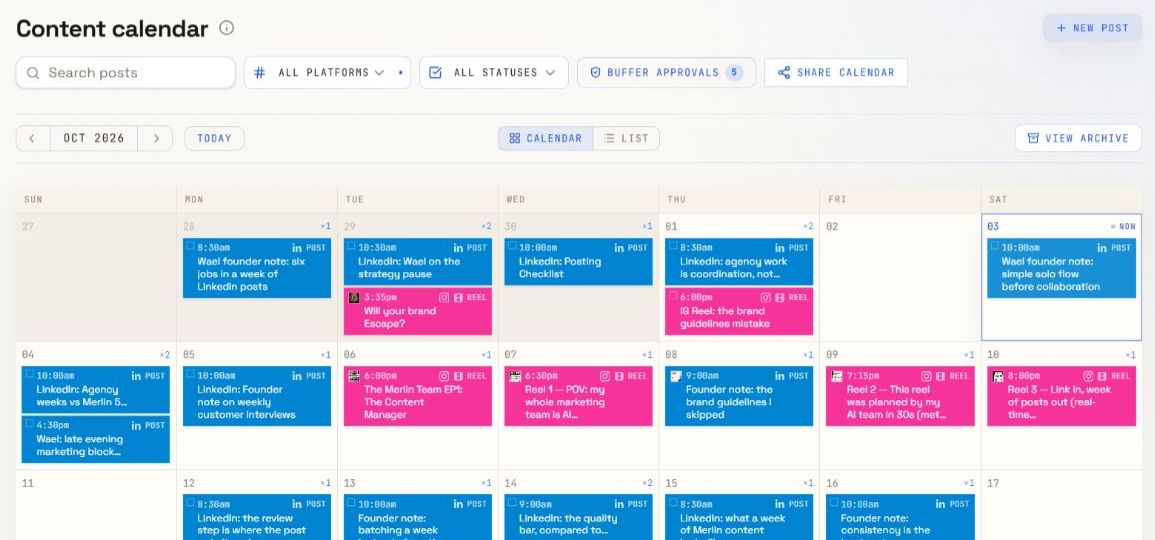
Plan for the work before the date.
Choose a cadence the team and client can support. Start with available source material and review capacity, then set dates. Leave room for missing evidence, revisions, and changes to the client’s offer.
The example below follows a fictional consultancy introducing a new service. It is an illustration, not a customer result or a recommended posting frequency for every client.
| Planned slot | Content and purpose | Work needed first |
|---|---|---|
| Tuesday | LinkedIn post explaining the problem the service solves. | Writer drafts Friday. Account lead checks Monday. Client confirms the wording. |
| Thursday | Instagram carousel answering a common customer question. | Client supplies a real question. Designer prepares slides. Reviewer checks the claim and crop. |
| Friday | A short reel showing how the service works. | Producer prepares a filming brief. Client records footage. Editor supplies the final video. |
If the footage is late, do not leave the reel marked ready. Move its date or use another reviewed item. Keep an unscheduled draft until its dependencies are resolved; an empty slot is clearer than a false publishing promise.
Turn each calendar idea into a brief.
“Write about the new service” leaves too many decisions to the next person. Give the writer or AI assistant a specific outcome, source, audience, format, and boundary.
Example brief · fictional client
Write a LinkedIn post for owners of small consultancies. Explain one problem our new service helps them solve. Use the approved service page as the source. Keep the tone calm and practical. Invite readers to ask a question. Do not invent customer results, prices, or quotes.
Adapt the brief to the format. A carousel needs a clear slide sequence. A reel needs a script, shots, and someone to create the footage. Reusing a source does not mean pasting the same content into every channel.
Review the draft against the brief before asking the client to spend time on it. Check the facts, opening, message, next action, and brand voice. Resolve avoidable errors inside the agency first.
In Merlin
Use the brand’s context to request drafts in a conversation, then inspect the saved posts in the post workspace. Content generation can prepare copy, carousel text, and reel briefs. A reel brief still needs production of the finished video.
Explore content creationMake the approval decision explicit.
Agree on one client contact who can give final sign-off, a deadline for feedback, and where feedback belongs. Ask reviewers to respond to the actual copy and media version, not an old screenshot of the calendar.
A useful review request names the change: “Please confirm the service description and approve this version by Wednesday.” If feedback arrives in several places, the account lead should bring it into one clear revision request.
Before marking an item ready, check:
- The client has approved the current copy and media through your agreed process.
- Names, figures, links, and claims match approved sources.
- The format and media fit the intended channel.
- The next action, account, date, and time zone are correct.
- Any change after sign-off has been reviewed again where needed.
If approval is late, move the post or keep it pending. Do not turn silence into permission unless the client has explicitly agreed to that process.
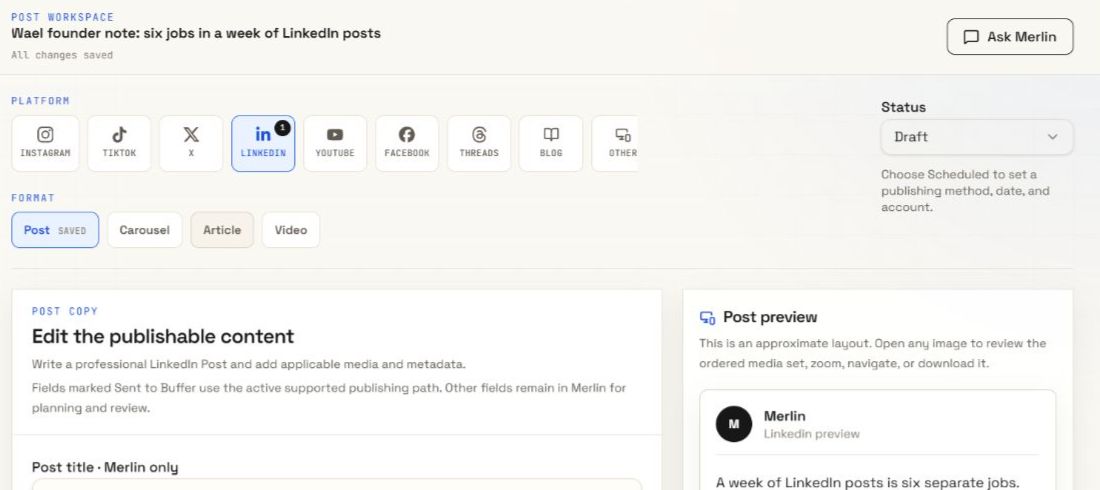
In Merlin, Approved is an internal post status. It does not mean the post has been published. A publishing approval authorizes the specific external action shown in its request. An action labelled “Approve and publish now” can publish immediately. Keep your client sign-off process distinct from that action.
Check the result, not just the slot.
Before scheduling, confirm the destination account, supported format, final media, and publishing method. Recheck time zones when the client and agency work in different locations.
In Merlin, a calendar date records your plan. Automatic publishing also needs a supported method, the correct connected account, and any required approval. If a post uses the Manual method, Merlin will not publish it for you.
After the intended time, inspect the publishing result. Keep the live post link in your delivery record where available. If publishing fails, check the reason and whether the post exists on the destination before retrying; avoid creating a duplicate.
Use this week to improve the next.
Close the week with a short review of the work and its results. Separate “we delivered the agreed content” from “the content helped the business.” One does not establish the other.
- Delivery: what published, moved, failed, or is still waiting for sign-off?
- Friction: which missing source, unclear brief, or late decision held work up?
- Learning: what did customers ask, and what does the available channel data show?
- Next week: which topic, format, or part of the review process should change?
Return useful feedback to the client reference and the next brief. Record a specific preference, such as “use a concrete example before the offer,” rather than “make it better.” Keep the process small enough that the team can maintain it for every client.
Before you build the next calendar.
Should each client have a separate calendar?
Use a separate client plan so goals, voice, sources, and approvals stay clear. You can also maintain an agency delivery overview for workload. In Merlin, select the client’s organization to work with its own calendar and business context.
How far ahead should an agency plan?
Start with a planning window your client can supply evidence and feedback for. Outline future campaigns, then prepare detailed briefs for the next workable batch. There is no single planning window that fits every client.
Does this require a client approval portal?
No. Use a review channel your client can access and keep a clear record of the version and decision. In Merlin, reviewing a post and approving an external publishing action are separate steps. Agree on how the client will give sign-off before the first review.
Put the process to work
Keep the plan close to the post.
Explore Merlin’s calendar, business context, and review workflow before deciding how it fits your agency.
Explore Merlin for agencies