
Record the next post.
Keep the date and an optional account or scheduling service with your post. Use the calendar to organize work you will publish yourself.
Merlin will not publish this post.
Social media scheduling
Schedule social media content in Merlin with your saved drafts and calendar in view. Choose a date and delivery method. Review the connected channel and publishing action before the post goes further.
The week, in view
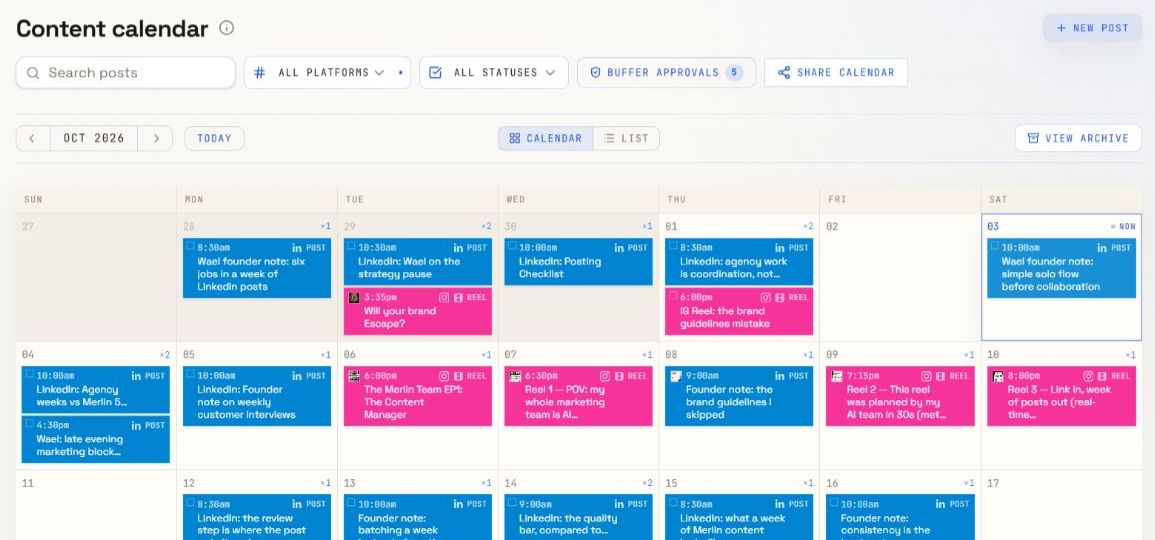
See the plan. Open a post to check its delivery settings.
Dates stay with your content
Supported Buffer delivery paths
Review before external actions
From saved draft to delivery
A calendar date is the plan. The delivery method determines what happens next.
Review the copy, format, and media. A publishing request should use the content you actually want to send.
Use manual scheduling to record a plan, or choose Buffer for a supported format and an enabled connected channel.
Check the destination account, requested date, and publishing content. Approve the specific external action when required.
Inspect the request and publishing status. If something fails or the request becomes stale, resolve the issue before you submit another action.
Two delivery choices
Keep the date and an optional account or scheduling service with your post. Use the calendar to organize work you will publish yourself.
Merlin will not publish this post.
Review the saved post, enabled Buffer account, and requested schedule. The destination and format must pass the publishing checks.
Complete any required approval, then inspect the result.
Channels and formats
These formats have a Buffer publishing path in Merlin. Your enabled connection and destination checks still determine whether a particular post can be sent.
| Channel | Buffer publishing path | Planning and editing only |
|---|---|---|
| Image posts, carousels, reels | Stories | |
| Posts, videos | Carousels, articles | |
| X | Posts, threads | — |
| Posts, reels, videos | Stories | |
| Threads | Posts | Threads |
| TikTok | Videos | Text posts, carousels |
| YouTube | Videos | Community posts |
Video and reel publishing need a saved video file. A script alone cannot be published. Blog articles remain available for planning and editing.
The actual publishing request
Merlin shows the requested Buffer schedule alongside the calendar schedule. Review the content and choose an enabled channel before you approve the external change.
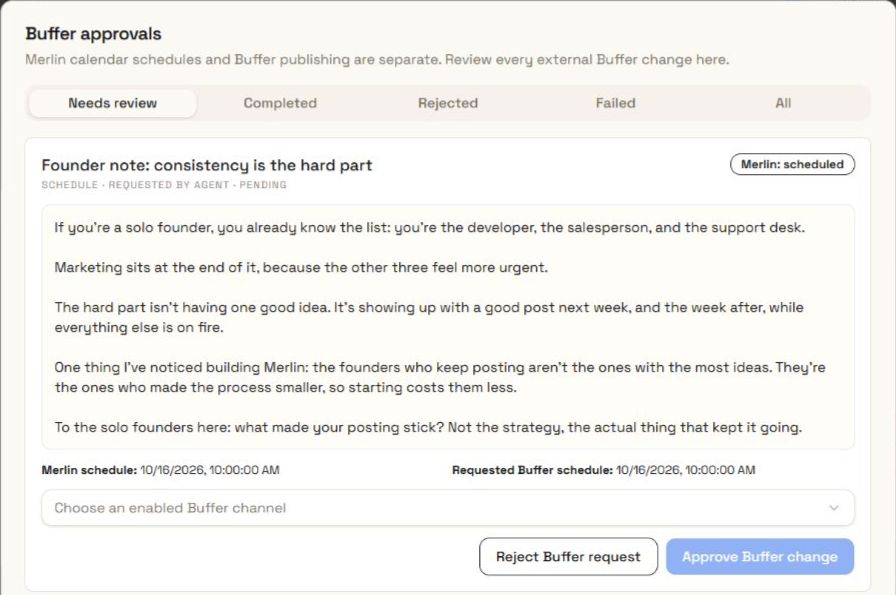
When a request needs attention
Read the error or request state. Check the connection, access, media, and current draft. Changes can make a request stale and require a fresh review. Confirm the external result before you submit another action.
Explore the content calendarBefore you schedule
Start from a saved post, choose the publishing method and date, and review the content and destination. Buffer publishing requires a supported format, an enabled connected channel, valid media, and any required approval. Check the result after the action runs.
Manual scheduling records your plan in Merlin. Merlin will not publish this post. Buffer scheduling sends a supported post through the connected Buffer channel after the required checks and approval.
No. Some formats are available for planning and editing only. The table on this page shows the current Buffer publishing paths. Availability also depends on your connected account, media, and the destination requirements.
No. A script or production brief is planning material. Video publishing needs a saved video file that passes the checks for the selected destination.
Read the request status and error, then check the account connection, permissions, selected format, media, and current saved content. A changed draft can require a new review. Check the external publishing result before submitting another action so you do not send the same post twice.
Your ideas. A full team.
Bring your business, your voice, and your next idea.