
The Merlin field guides / Choosing your workflow
AI social media software
vs ChatGPT.
Choose around the work your team needs to finish, from the first idea to the published post.
ChatGPT can be enough for social media drafting and research when you already have a reliable process for review and publishing. Dedicated social media software can fit recurring work that needs business context, saved posts, a calendar, and supported publishing actions in one workspace.
The useful question is what happens after you like the draft. Where does the final version live? Who checks it? Which account will publish it? A writing assistant and a social content workspace can both help, and you may use them together.
This comparison is written by Merlin and uses Merlin as one example of dedicated social media software. Other products have different capabilities. The recommendations below are our interpretation of the workflows, rather than a measured test of writing quality.
01 / The comparison
Compare the work, step by step.
ChatGPT supports more than a single prompt. Its Projects documentation describes shared files, instructions, and connected sources. ChatGPT Work and connected tools can also support research, deliverables, and actions. What you can use depends on your available tools and access.
| Work to do | ChatGPT | Merlin |
|---|---|---|
| Drafting | Develop ideas and copy through a conversation; use research and tools when available. | Create social content from a conversation and keep selected drafts as editable posts. |
| Business context | Projects can share uploaded files, instructions, and connected sources across related chats. | Business context and brand voice provide a shared starting point for content. Most initial business context is gathered from your website and other online presence; review and refine it. |
| Revisions | Ask for changes, compare alternatives, and refine the result in the conversation or a working file. | Revise the saved post and its media in the post workspace. Check the version that will be used next. |
| Review | Use feedback and connected tools to support your chosen review process. Decide where the final sign-off is recorded. | Review the saved copy, media, and post status together. Content sign-off and approval of an external action are separate decisions. |
| Calendar | Create a calendar document or spreadsheet and use connected tools or scheduled tasks where supported. You choose how the plan stays current. | Organize dated saved posts in the content calendar and open the post to inspect its current details. |
| Publishing | Check the exact action supported by your connected tool, its permissions, and the result. A scheduled task alone does not establish that a social post was published. | Manual scheduling records a plan. Supported Buffer delivery needs an enabled connected channel, valid format and media, and any required action approval. Inspect the result. |
ChatGPT also supports scheduled tasks, including workflows that use plugins and skills. Availability depends on plan and workspace settings. For either product, confirm the actual publishing connection, supported action, destination, and outcome before relying on it.
For Merlin’s delivery limits, see social media scheduling. A calendar date, an approved draft, and a successful external publishing result describe different things.
02 / Keep what works
When ChatGPT is enough.
If you need an occasional announcement, a new angle, or help editing an existing post, ChatGPT may cover the work you need. Give it the source facts, audience, voice examples, and boundaries. Check the result before using it.
- You already have a calendar, a place for final drafts, and a clear review process.
- You value a flexible assistant for work beyond social media.
- Your connected tools already handle the handoff and external actions you need.
Merlin does not automatically write a better post simply because it has a dedicated workflow. If your current process is reliable and the extra brand would add little value, keeping it is reasonable. Both tools still depend on good context and human judgment.
03 / Recurring social content
When Merlin fits the workflow.
Consider Merlin when keeping the content organized is part of the problem: your business context lives in one document, the latest draft is in a chat, and the planned date is somewhere else.
Start with business context and brand voice, then create and save posts. Use the content calendar to see the plan and the post workspace to inspect the current copy and media.
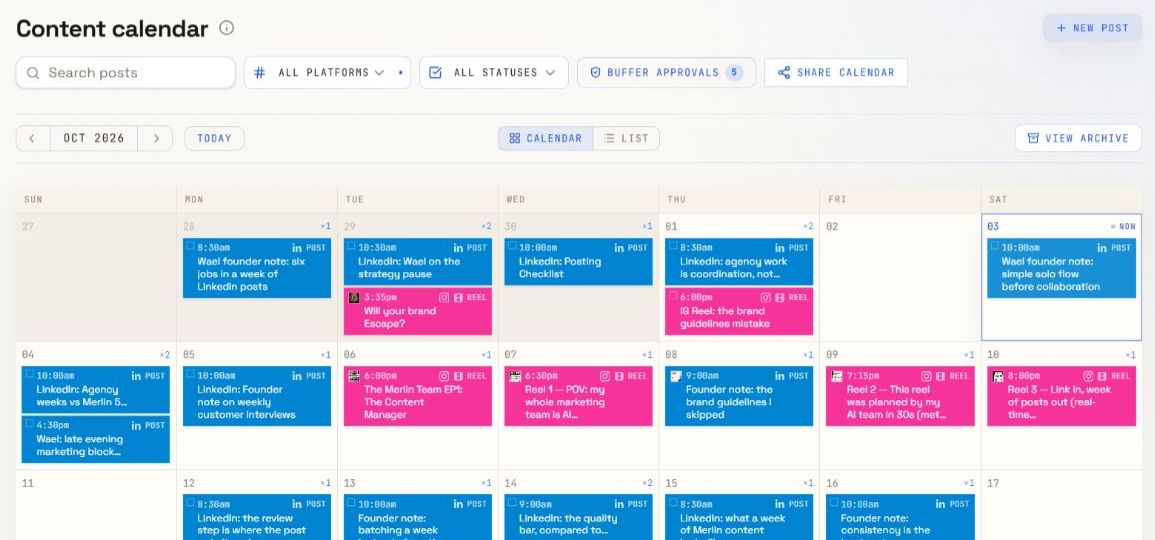
For repeat work, a saved post gives the next decision a concrete object: this copy, these assets, this status, and this date. That can be useful for agencies and teams managing several pieces of content.
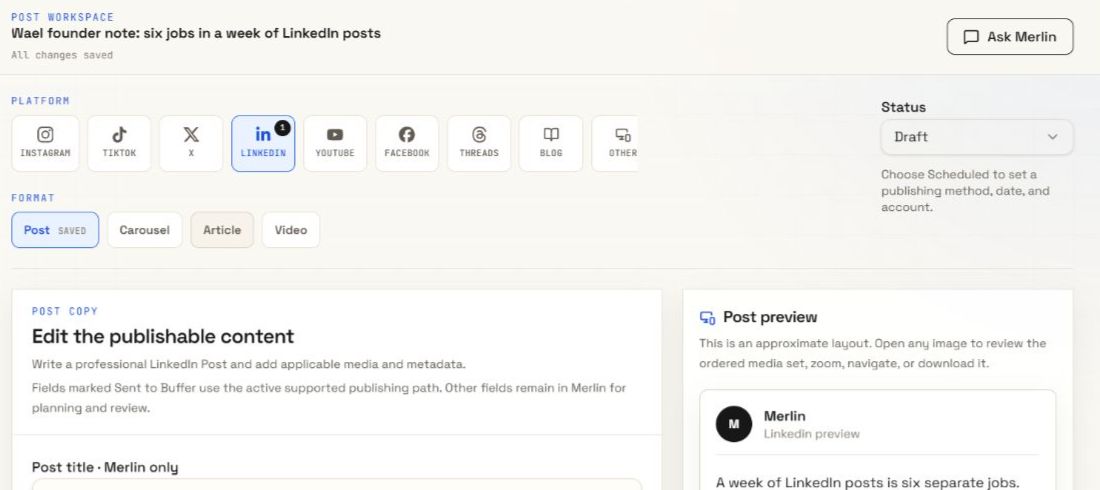
Agree on who signs off and where that decision is recorded. Follow the content approval workflow before delivery. Choose manual planning or a supported Buffer action, and verify the external result separately.
04 / Make your own comparison
Try both with the same brief.
Use a real, approved update from your business. Give both tools the same source facts, voice examples, audience, format, and intended action. Allow each tool to use its context features so the comparison reflects how you would actually work.
A reusable evaluation brief
Use the attached approved business update to draft a LinkedIn post for [audience]. The goal is [goal]. Follow these voice examples: [examples]. Use only confirmed facts and flag anything missing. End with [call to action].
Then revise the opening using my feedback. Help me identify the final version, the reviewer, the intended date, and the steps needed to publish it through my available tools.
- Check the content. Are the facts supported? Does the voice fit? Which edits are still needed?
- Make one revision. Can another person find and review the current version?
- Follow the handoff. Where do the media, sign-off, date, and destination live?
- Check delivery. Does the chosen connection support this format? Where will you inspect success or failure?
- Consider the ongoing cost. Compare your actual plan, tool access, and manual work. Do not decide from a single attractive draft.
This is a method for your own evaluation. We have not run a controlled head-to-head benchmark or assigned either product a quality score.
05 / Common questions
Before you choose.
Can ChatGPT remember my business and brand voice?
You can put business information, examples, and instructions in a Project and use that shared context in related chats. Keep the sources current and review the result. Merlin offers business context and brand voice within its social content workflow; access to context is not unique to Merlin.
Can ChatGPT schedule social media posts?
ChatGPT supports scheduled tasks and connected tools. Whether your setup can schedule a specific social post depends on the available connection and supported action. Check account access, media requirements, approvals, and the publishing result. A recurring writing task is not by itself a confirmed social publishing integration.
Does Merlin publish every format automatically?
No. Manual scheduling records a plan without publishing. Buffer delivery requires a supported format, an enabled channel, valid media, and any required approval. A video brief is not a finished video file.
Can I use both?
Yes. You can use ChatGPT for broader research or early ideas and use Merlin to organize saved social posts. Keep the source facts and final version clear across tools so feedback does not go to an old draft.
06 / Sources and scope
What this comparison is based on.
Checked 21 October 2026. ChatGPT capabilities are based on OpenAI’s official documentation: Projects and chats, ChatGPT on the web, and Scheduled tasks. Features and access can change.
Merlin descriptions are based on its current product workflow and the feature pages linked above. Screenshots show Merlin only. This article makes no claims about comparative pricing, generation speed, or measured writing quality.
See the product workflow
Give the draft
a next step.
Explore how business context, saved posts, review, and the calendar fit together in Merlin.
Explore Merlin’s workflowConsidering Claude too? Read AI social media software vs Claude.